/">

The Future of Cryptocurrency Mining is Here

Over 100,000 Users are Earning More Coins by using CudoMiner's Cryptocurrency Miner. Free to download. Start earning in under 3 minutes.

Download CudoMiner

Earn Money from
your Idle Hardware

CudoMiner turns any Windows or Mac PC into a passive income machine. When your computer sits idle — overnight, during meetings, or between gaming sessions — CudoMiner mines the most profitable cryptocurrency available and deposits earnings directly into your wallet.

  • Idle detection: starts mining automatically after 5 minutes (configurable) of no activity
  • Instant pause when you return to your PC — zero performance impact while you work or game
  • Auto coin-switching picks the highest-earning algorithm for your exact GPU model in real time
  • Built-in overclocking adds up to 30% extra earnings with no manual configuration
  • Temperature monitoring automatically throttles mining to protect your GPU hardware
  • Works on Windows 10/11, macOS 10.14+ and Ubuntu Linux — one unified account
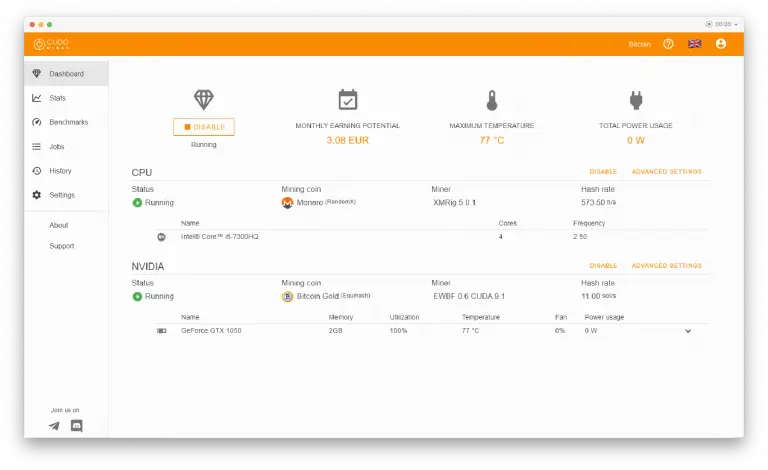
PC / Laptop
CudoMiner PC and laptop mining interface showing multi-tab GPU and CPU mining on Windows

Boost Profits by up to 30%
for your Mining Farm

CudoFarm — part of the CudoMiner platform — is purpose-built for mining farm operators managing 10 to 10,000+ GPU rigs. A single web console gives you complete visibility and control over every device, every algorithm and every dollar of profitability.

  • Centralised control of unlimited GPU and ASIC workers from one dashboard
  • Bulk configuration: apply settings to hundreds of rigs in a single click
  • Real-time per-worker profit tracking with automatic alerts for offline or underperforming units
  • Auto-tuning overclocking per GPU model maximises hashrate and minimises power draw
  • Automated coin switching across the entire farm — always mining the most profitable algorithm
  • Full remote access from any browser — monitor your farm from home or anywhere in the world
  • Reduces manual intervention by up to 95% compared to unmanaged mining setups
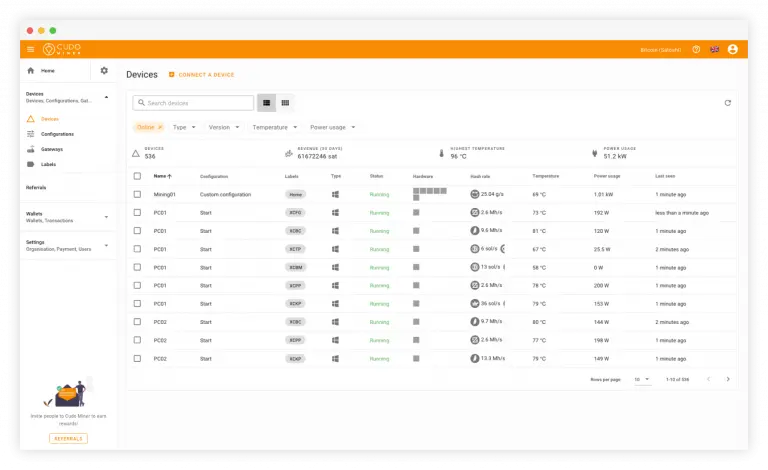
Mining Farms
CudoMiner mining farm management dashboard showing all GPU rigs with hashrate and earnings

Increase Profitability by Automating Your Mining Rig

CudoMiner is engineered for dedicated GPU rigs — whether you run a 6-GPU open-frame rig in your garage or a 30-GPU rack in a data centre. CudoOS (included) removes Windows overhead entirely, giving you maximum hashrate from every GPU.

  • CudoOS: Linux-based mining operating system with zero desktop overhead, boots from USB
  • Automatic per-algorithm overclocking profiles — no manual benchmark files or tuning sessions
  • Supports NVIDIA and AMD GPUs simultaneously in the same rig
  • Auto-switching selects the most profitable algorithm across 50+ coins
  • Built-in watchdog restarts crashed miners automatically — no babysitting required
  • Power efficiency mode reduces electricity cost while maintaining competitive hashrate
  • Full integration with CudoFarm web console for multi-rig management
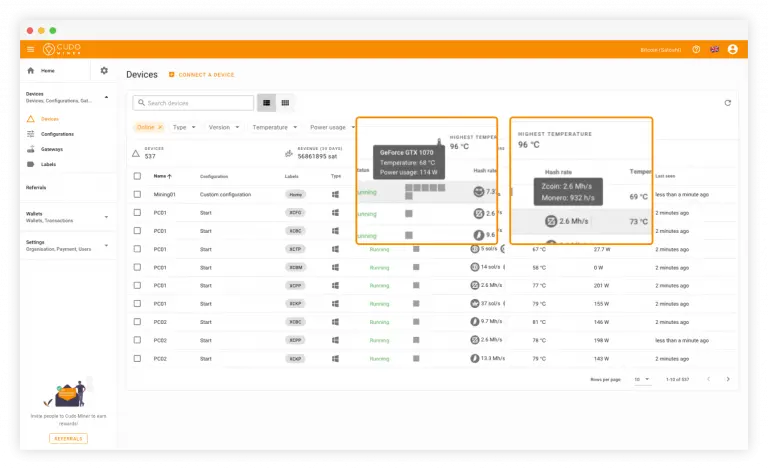
Rig Miners
CudoMiner GPU rig mining showing per-GPU hashrate and hardware performance metrics

24/7 Earning Potential
for your Internet Cafe

Every idle seat in your cafe is money left on the table. CudoMiner for Internet Cafes activates mining automatically on unoccupied PCs and pauses the instant a customer sits down — completely invisibly. One central dashboard manages your entire cafe fleet.

  • Customer-first: CudoMiner pauses within seconds when a seat is occupied, no lag or disruption
  • Centralised deployment: push CudoMiner to all cafe PCs from a single installer package
  • Per-PC earnings tracking: see exactly how much each machine contributes
  • Temperature limits set per machine protect your cafe hardware from overheating
  • Works alongside your existing cafe management software — no conflicts
  • Earnings accumulate in your CudoMiner account and withdraw to any crypto wallet
  • Many cafe operators report recovering 20-40% of electricity costs through idle mining revenue
iCafe's
CudoMiner internet cafe idle mining mode showing earnings from unoccupied PC seats

AFK? Your Gaming PC
Can Earn for You

Over 100,000 gamers already use CudoMiner to earn during downtime — loading screens, queue times, AFK periods, overnight, or whenever they step away from the desk. The earnings go straight toward Steam games, in-app purchases or real-money crypto withdrawals.

  • Zero gaming performance impact: CudoMiner is not active while you play — it detects game processes
  • Earns during queue times, loading screens, breaks and overnight
  • GPU stays within safe temperature range — same thermal load as gaming, not hotter
  • Quick setup: install once, configure your wallet, forget about it
  • Works with NVIDIA GeForce and AMD Radeon gaming GPUs
  • Monthly withdrawals to Bitcoin, Ethereum or 20+ other coins
  • Average gamer with RTX 3070 earns $15-40/month in passive crypto income
Gamers
CudoMiner for gamers showing auto coin switching earning crypto when gaming PC is idle
As seen on
BBC MoneyWeek Forbes
100K+
Active miners worldwide
50+
Cryptocurrencies supported
+30%
Average profit boost
$0
Cost to download

Increase your profits

'Over 100,000+ users trust CudoMiner's Cryptocurrency Miner for the highest profits'

Our cryptocurrency miner, mining and cloud computing platforms have features unparalleled by other leading crypto mining software. From automated mining with CudoMiner, to an end-to-end solution that combines real-time stats, monitoring, automation, auto-adjusting overclocking settings, advanced reporting and pool integrations with CudoFarm — we have built the most complete mining ecosystem available.

We have a solution for all miners, from single-PC users to large-scale mining farms operating thousands of GPUs and ASICs. Our platforms consistently reduce manual intervention by up to 95% while simultaneously increasing profitability through smarter algorithm selection and hardware optimisation.

Supporting GPU, CPU and ASIC hardware through a unified web console that gives you full monitoring and remote management of every device — from any browser, anywhere in the world. CudoMiner is fully automated and optimised for maximum performance on Windows, Ubuntu Linux, CudoOS and ASIC firmware.

Find out more
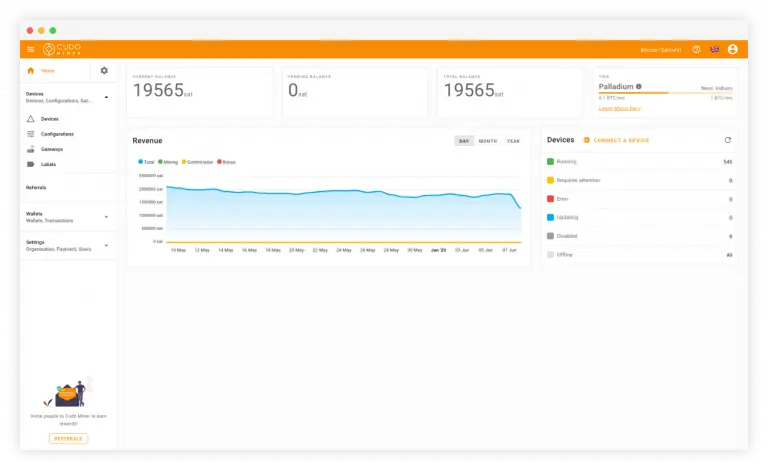
CudoMiner web console dashboard showing real-time earnings, hashrate and device status for all miners
Why 100,000+ miners choose CudoMiner

The Most Complete Crypto Mining Software Available

Every feature is designed around one goal: maximum earnings with minimum effort, for every type of miner.

Auto Coin Switching

CudoMiner continuously monitors live profitability across 50+ coins and all supported algorithms. Every few minutes it recalculates optimal earnings for your exact hardware and switches automatically if a more profitable coin is available. No manual intervention — maximum income 24/7.

📊

Real-Time Earnings Dashboard

Watch your earnings, hashrate, power consumption, temperatures and worker status update live in both the desktop app and the web console. Custom alerts notify you instantly if any device goes offline or underperforms.

Built-in Auto-Overclocking

CudoMiner finds the optimal memory clock, core clock and power limit for each GPU model on each mining algorithm automatically. Independent tests show this adds 15-30% hashrate over factory default settings with no additional electricity cost.

🌡

Temperature Safety System

Set per-GPU temperature and power limits. CudoMiner throttles mining speed when limits are approached and pauses completely if they are exceeded. Your hardware is protected around the clock — even when you are away from your PC.

🎮

GPU + CPU + ASIC Support

A single CudoMiner account manages NVIDIA and AMD GPUs, Intel and AMD CPUs (best for Monero mining), and ASIC hardware via CudoOS. Mixed hardware types are displayed and managed from one unified dashboard.

🌐

Web Console & Remote Management

The CudoMiner web console gives complete remote control of every mining device from any browser — monitor performance, change settings, withdraw earnings and respond to alerts from your phone or any computer, anywhere in the world.

Deep dive: auto coin switching

How CudoMiner's Auto Coin Switching Maximises Your Earnings

Exclusive to CudoMiner

Intelligent Algorithm Selection — Every 5 Minutes

Most mining software locks you into one coin and one algorithm. CudoMiner's auto-switching engine runs a continuous profitability calculation across every supported coin, accounting for real-time market price, current network difficulty, block reward and your GPU's specific hashrate on each algorithm.

When a more profitable option appears, CudoMiner switches automatically — reconfiguring overclocking profiles, connecting to the optimal mining pool and updating your dashboard — all within seconds and with zero manual input from you.

  • Profitability checked every 5 minutes across all 50+ supported coins
  • Algorithm switching takes under 10 seconds with no earnings gap
  • Per-GPU model optimisation: an RTX 3060 Ti and RTX 4070 may mine different coins simultaneously
  • You can disable auto-switching and pin to a specific coin if preferred
  • Payout in the coin of your choice — CudoMiner auto-converts earnings
  • Average earnings improvement: 15-25% above single-coin manual mining
CudoMiner auto coin switching interface showing real-time algorithm profitability comparison and switching
Supported Coins

Which Cryptocurrencies Can CudoMiner Mine?

CudoMiner supports 50+ coins across all major GPU-minable algorithms. The list is updated regularly as profitable new coins launch. All coins switch automatically — you never need to reconfigure manually.

CoinAlgorithmBest HardwareRelative ProfitabilityAuto-Switch
Ravencoin (RVN) KawPow NVIDIA RTX series
High
Ergo (ERG) Autolykos v2 NVIDIA & AMD GPUs
High
Ethereum Classic (ETC) Ethash AMD RX 6000 series
Medium-High
Monero (XMR) RandomX Any modern CPU
Medium (CPU)
Flux (FLUX) ZelHash NVIDIA & AMD
Medium
Kaspa (KAS) kHeavyHash Any GPU
High
Alephium (ALPH) Blake3 Alephium NVIDIA RTX series
Medium
Zephyr (ZEPH) RandomX + GPU GPU + CPU combo
High
Cortex (CTXC) Cuckaroo Cortex NVIDIA (VRAM 6GB+)
Medium
Bitcoin Gold (BTG) Equihash NVIDIA & AMD
Low-Medium

Profitability is indicative and changes with market conditions. CudoMiner always mines the currently most profitable coin for your hardware automatically.

Deep dive: overclocking

Advanced Settings & Built-in Overclocking

Up to 30% more hashrate

Automatic GPU Optimisation Per Algorithm

CudoMiner stores optimised overclocking profiles for hundreds of GPU models across all supported algorithms. When it switches coins, it simultaneously applies the optimal memory clock, core clock and power limit for your specific GPU — no benchmark tools, no manual tuning, no trial and error.

Advanced miners can override these settings with custom profiles per algorithm. All configurations are stored in the CudoMiner web console with a full history log, so you can track performance improvements over time and roll back instantly if needed.

  • Pre-tuned profiles for NVIDIA GTX/RTX and AMD RX/RX 6000/7000 series
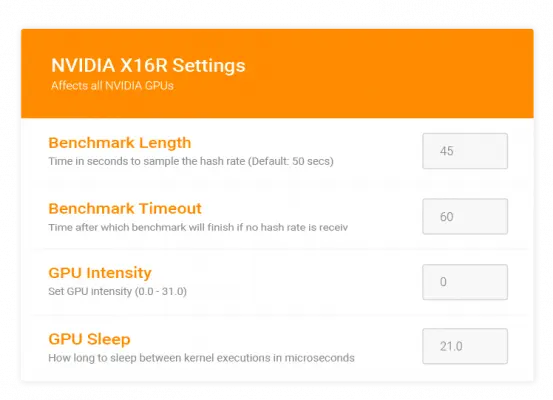
  • Per-algorithm memory clock, core clock and power limit settings
  • Overclocking adjusts automatically when the active coin changes
  • Power efficiency mode: maximise hashrate-per-watt for low electricity costs
  • Custom profiles saved and synced to your CudoMiner account
  • Full history log of all configuration changes with hashrate impact
CudoMiner advanced settings panel showing GPU overclocking profiles, memory clock and power limit controls
Hardware Compatibility

Which GPU Works Best with CudoMiner?

CudoMiner works with any NVIDIA or AMD GPU with at least 4 GB VRAM. Here is an estimated monthly earnings guide based on current market conditions.

GPU ModelVRAMEst. Hashrate (Ergo)Est. Monthly EarningsOC BoostRecommended
NVIDIA RTX 4090 24 GB ~330 MH/s $80-180/mo +15% ⭐⭐⭐
NVIDIA RTX 4070 Ti 12 GB ~165 MH/s $40-90/mo +20% ⭐⭐⭐
NVIDIA RTX 4070 12 GB ~130 MH/s $30-70/mo +22% ⭐⭐⭐
NVIDIA RTX 3080 10 GB ~200 MH/s $50-110/mo +18% ⭐⭐⭐
NVIDIA RTX 3070 8 GB ~145 MH/s $35-80/mo +20% ⭐⭐⭐
NVIDIA RTX 3060 Ti 8 GB ~130 MH/s $30-65/mo +25% ⭐⭐⭐
NVIDIA RTX 3060 12 GB ~105 MH/s $25-55/mo +28% ⭐⭐
AMD RX 7900 XT 20 GB ~260 MH/s $65-140/mo +16% ⭐⭐⭐
AMD RX 6700 XT 12 GB ~155 MH/s $38-82/mo +22% ⭐⭐⭐
AMD RX 6600 XT 8 GB ~115 MH/s $28-60/mo +24% ⭐⭐
AMD RX 580 8 GB ~55 MH/s $13-28/mo +18%
Intel CPU (any) CPU only $5-20/mo (XMR) +5%
💡
Estimates only. Monthly earnings depend on current cryptocurrency prices, network difficulty and your electricity cost. CudoMiner auto-switches to whichever coin is most profitable for your GPU at any given time — actual earnings will vary from these Ergo-based estimates.
App Screenshots

CudoMiner — Inside the Interface

Real screenshots of the CudoMiner desktop app and web console. No mockups, no marketing renders.

CudoMiner web console dashboard — live earnings summary, hashrate total and all device status
Web console dashboard — live earnings overview
CudoMiner device list — all GPUs and mining workers with individual hashrate and status
Device list — all GPUs and workers at a glance
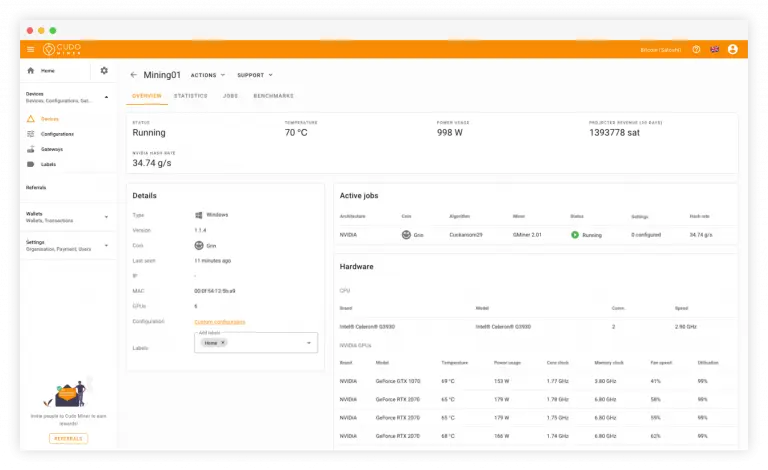
CudoMiner device details — per-GPU hashrate, temperature, fan speed and mining coin
Per-device detailed stats
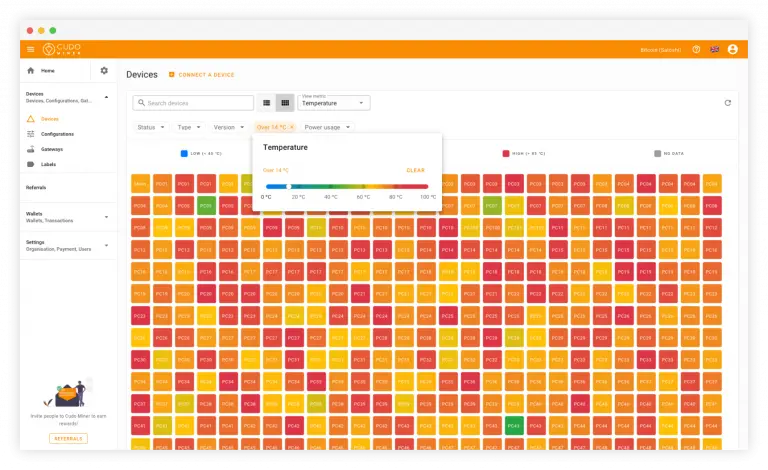
CudoMiner temperature monitoring panel — GPU heat tracking during mining operations
Temperature and fan speed monitoring
CudoMiner hashrate by hardware — zoomed GPU performance metrics and algorithm details
Hashrate breakdown by hardware
Comparison

CudoMiner vs Other Mining Software — Full Feature Comparison

How does CudoMiner compare to NiceHash, Hive OS, PhoenixMiner and lolMiner on the features that matter most?

FeatureCudoMinerNiceHashHive OSPhoenixMinerlolMiner
Auto coin switching✓ Real-time✓ Yes⚡ Manual✗ No✗ No
GPU + CPU + ASIC✓ All three✓ GPU+CPU✓ All threeGPU onlyGPU only
Built-in auto-OC✓ Per algorithm⚡ Limited✓ Yes✗ No✗ No
Temperature auto-throttle✓ Configurable⚡ Basic✓ Yes✗ No✗ No
Mining fee1–2%2%+pool fees$3/rig/mo0.65%1%
Mac support✓ macOS✗ No✗ No✗ No✗ No
Remote web console✓ Full control✓ Yes✓ Yes✗ No✗ No
Idle mining mode✓ Auto-detect✗ No✗ No✗ No✗ No
Free to download✓ Yes✓ YesPaid plans✓ Yes✓ Yes
Coins supported50+ auto35+ poolsAny algoETC/ETH only30+ manual
Mining farm tools✓ CudoFarm full suite⚡ Basic✓ Yes✗ No✗ No
Dedicated mining OS✓ CudoOS✗ No✓ Hive OS✗ No✗ No
Getting started

Start Mining Crypto in 4 Simple Steps

CudoMiner is designed to be the easiest professional mining software available. From download to first earnings in under 5 minutes.

1

Download & Install

Download the free CudoMiner installer for Windows, Mac or Linux. Run it — installation completes in under 2 minutes with no complex configuration. Signed by Cudo Ventures Ltd.

2

Create a Free Account

Sign up at cudominer.com with your email address. No credit card required. Your account is also your web console for monitoring and withdrawals from any browser.

3

Add Your Wallet & Start

Enter your cryptocurrency wallet address — this is where earnings will be paid. Click Start Mining. CudoMiner detects your hardware, selects the best algorithm and begins earning immediately.

4

Earn & Withdraw

Watch real-time earnings on your dashboard. Withdraw to your personal wallet at any time once the minimum threshold is reached. Choose your payout coin from 20+ options including BTC and ETH.

Use Cases

Who Uses CudoMiner — Real World Applications

From bedroom gamers to enterprise mining operations — CudoMiner is built to scale with your ambitions.

CudoMiner PC & Laptop Owners use case — Mine during idle time and earn passive income from hardware you already own. No upfront cost, no specialist knowledge required.

PC & Laptop Owners

Mine during idle time and earn passive income from hardware you already own. No upfront cost, no specialist knowledge required.

The typical home user earns $10-50/month from a mid-range gaming GPU without any impact on normal PC use.

CudoMiner Mining Farm Operators use case — Manage hundreds or thousands of GPU workers from a single CudoFarm console. Automate everything — switching, OC, alerts, reporting.

Mining Farm Operators

Manage hundreds or thousands of GPU workers from a single CudoFarm console. Automate everything — switching, OC, alerts, reporting.

Large farms report 20-30% profitability increase and 95% reduction in manual labour after switching to CudoFarm.

CudoMiner Rig Builders use case — CudoOS eliminates Windows overhead, giving dedicated rigs maximum hashrate. Auto-tuning OC works continuously for peak performance.

Rig Builders

CudoOS eliminates Windows overhead, giving dedicated rigs maximum hashrate. Auto-tuning OC works continuously for peak performance.

A 6-GPU CudoOS rig typically sees 5-12% better hashrate than the same hardware running Windows.

CudoMiner Internet Cafe & esports Venues use case — Turn idle PC seats into revenue streams. Automatic pause when customers sit down. Full fleet management from one dashboard.

Internet Cafe & esports Venues

Turn idle PC seats into revenue streams. Automatic pause when customers sit down. Full fleet management from one dashboard.

A 50-seat cafe running CudoMiner on 30 average idle seats can offset a significant portion of electricity costs.

CudoMiner Gamers use case — Mine during downtime, queue times, AFK sessions and overnight. Zero impact on in-game performance. Earnings go to Steam or crypto wallets.

Gamers

Mine during downtime, queue times, AFK sessions and overnight. Zero impact on in-game performance. Earnings go to Steam or crypto wallets.

An RTX 3070 gaming GPU earns $15-40/month in typical AFK time — enough to fund several new games per year.

CudoMiner Professional Miners use case — Advanced configuration, custom pool connections, per-worker wallet assignment and full API access for custom integrations and automation.

Professional Miners

Advanced configuration, custom pool connections, per-worker wallet assignment and full API access for custom integrations and automation.

Professional miners use CudoFarm API to build custom dashboards, automated alerts and predictive profitability systems.

TL;DR: CudoMiner is free mining software that automatically mines the most profitable coin for your GPU. Download → Install → Earn. No experience needed.  ·  Download for Windows free →
Passive income

Earn While Your System Is Idle — CudoMiner Idle Mining Explained

Unique to CudoMiner

Your PC Already Earns Nothing When You Step Away — CudoMiner Changes That

The average PC in a home or office sits completely idle for 8 to 16 hours per day. Every one of those hours your GPU is doing nothing — consuming standby power, earning zero. CudoMiner's idle mining mode turns that dead time into passive cryptocurrency income.

The system works through a lightweight background process that monitors keyboard and mouse activity. When no input is detected for a configurable threshold (default: 5 minutes), CudoMiner automatically activates, selects the most profitable mining algorithm for your GPU model, and begins earning. The moment you move the mouse or press a key, CudoMiner pauses within 2 seconds — completely invisible to you and with zero performance impact on whatever you do next.

Unlike simple CPU mining plugins, CudoMiner's idle mode uses your GPU at full efficiency — the same hardware that would cost thousands of dollars in a dedicated mining rig. You already own it. CudoMiner simply monetises the time it spends idle.

  • Idle threshold is configurable: 1 minute to 60 minutes — set it to match your workflow
  • Game detection: CudoMiner recognises running game processes and never activates during gaming sessions, even if you go AFK in a game
  • Screen saver integration: optionally start mining whenever the screensaver activates
  • Scheduled mining: set specific hours when CudoMiner can mine regardless of activity (e.g., always mine 2 AM – 7 AM)
  • Temperature cap: if GPU reaches your limit (e.g., 78°C), mining throttles automatically — your hardware stays safe overnight
  • Power cap: set a maximum wattage to keep electricity costs predictable
  • Silent mode: CudoMiner suppresses all notifications while in idle mining to avoid interrupting work
CudoMiner idle mining mode — automatic cryptocurrency mining when PC is not in use
RTX 3070
~8h idle/day
~$22–38/month
estimated passive income
RTX 4070
~8h idle/day
~$30–55/month
estimated passive income
RX 6700 XT
~8h idle/day
~$18–34/month
estimated passive income

Estimates based on ~8h idle per day at current coin prices. Actual earnings depend on electricity cost and market conditions.

Enterprise mining

CudoFarm — Professional Mining Farm Management Platform

Built for serious miners

Centralised Control of Every GPU From One Web Console

CudoFarm is the professional tier of the CudoMiner platform, designed for operators managing 10 to 10,000+ GPU and ASIC workers across one or many locations. Everything is controlled from a single web-based console — no on-site management software, no per-machine configuration headaches.

The platform was built by professional miners, for professional miners. Every feature addresses a real operational pain point: reducing time spent on manual configuration, maximising uptime, catching hardware failures before they cascade, and always ensuring every worker is mining the optimal coin.

CudoFarm Core Features

  • Unlimited worker management: connect any number of GPU rigs, ASIC units or Windows/Linux PCs to a single CudoFarm account
  • Bulk configuration: apply overclocking profiles, algorithm settings and wallet addresses to hundreds of workers simultaneously with one action
  • Per-worker profit tracking: see exactly how much each individual GPU or rig earns per hour, day and month
  • Automated downtime alerts: instant email or push notification if any worker goes offline, drops below a hashrate threshold or overheats
  • Worker grouping: organise machines by location, hardware type, ownership or any custom tag — apply settings to a group in one click
  • ASIC management: CudoFarm integrates with major ASIC manufacturers for firmware-level control of Bitcoin mining hardware
  • Full remote access: manage your entire farm from any browser, on any device, from anywhere in the world — no VPN required
  • Custom pool configuration: professional miners can connect workers to specific pools and wallets, bypassing the automated system entirely
  • API access: full REST API for building custom dashboards, automation scripts, profitability calculators and third-party integrations
  • Withdrawal management: consolidated earnings view across all workers, with direct withdrawal to any BTC, ETH or altcoin wallet
CudoFarm mining farm management — centralised GPU worker control panel with hashrate and earnings
📊
Farm operator case study: A typical 100-GPU farm switching from manual management to CudoFarm reports saving 15–20 hours of manual configuration work per week, a 20–30% profitability increase from auto-switching, and a 95% reduction in time-to-response for hardware failures thanks to automated alerts. The CudoFarm platform is free to use — no per-worker subscription fee.
Security & trust

Is CudoMiner Safe? — Security, Privacy & Trust Explained

Signed Installer & Softpedia CLEAN

The CudoMiner installer for Windows is digitally signed by Cudo Ventures Ltd using a code-signing certificate. You can verify the signature by right-clicking CudoMiner_Setup_Windows.exe → Properties → Digital Signatures. Any valid signature shows "Cudo Ventures Ltd" as the publisher.

CudoMiner has been awarded the Softpedia CLEAN certification — an independent review confirming the software is free from viruses, spyware, adware, trojans and backdoors. The CLEAN badge means the software does exactly what it says it does.

Why Antivirus Flags Mining Software

Some antivirus programs categorise all mining software as "potentially unwanted programs" (PUP) because malicious actors have historically installed miners on victims' computers without consent. This generic flag does not mean CudoMiner is unsafe — it means your antivirus cannot distinguish between software you chose to install and software installed by malware.

To resolve antivirus interference: add the CudoMiner installation folder to your antivirus exclusions list. The default path is C:\Program Files\CudoMiner on Windows.

Your Wallet, Your Earnings

CudoMiner does not hold your cryptocurrency. Earnings accumulate in your CudoMiner account balance and are paid out on demand to your own external wallet address once the minimum withdrawal threshold is reached. The threshold varies by coin — typically 0.001 BTC, 0.01 ETH or equivalent for altcoins.

You can withdraw in your preferred coin regardless of which coin was mined — CudoMiner automatically converts your mining earnings to your payout coin of choice. Supported payout coins include Bitcoin (BTC), Ethereum (ETH), Litecoin (LTC), Monero (XMR) and many others.

Privacy & Data Collection

CudoMiner collects only the hardware telemetry necessary for profitability optimisation (GPU model, hashrate, temperature). No personal browsing data, no keylogging, no screen capture. Full privacy policy is available at cudominer.com/privacy.

🔒
100,000+ users mine safely every day. CudoMiner has been running since 2018 with no security incidents. Your hardware and earnings are protected.
Technical details

Mining Pools, Algorithms & Payouts — How CudoMiner Works Under the Hood

What Is a Mining Pool and Why Does It Matter?

Cryptocurrency mining is probabilistic — individually, a single GPU might solve a block once a year. Mining pools aggregate the hashrate of thousands of miners, find blocks consistently, and distribute rewards proportionally to each contributor's share. CudoMiner connects you to optimised pools automatically — you benefit from stable, frequent payouts without managing pool connections yourself.

CudoMiner selects pools based on current fee rates, reliability (uptime history), geographic proximity (for lower latency and higher share acceptance rates) and whether the pool supports the current highest-profit algorithm. This selection happens automatically every time the coin switches.

Supported Mining Algorithms

CudoMiner supports all major GPU-minable proof-of-work algorithms. Each algorithm favours different GPU architectures — KawPow for example is memory-intensive and benefits NVIDIA RTX cards, while RandomX is CPU-optimised and rewards users who run Monero mining on their processor rather than GPU.

Algorithm Best Hardware Example Coins
KawPow NVIDIA RTX RVN, NEOX
Autolykos v2 NVIDIA & AMD ERG
RandomX CPU XMR, ZEPH
Ethash / Etchash AMD RX 6000 ETC
ZelHash NVIDIA & AMD FLUX
kHeavyHash Any GPU KAS
Equihash NVIDIA & AMD BTG, ZEN
Blake3 NVIDIA RTX ALPH

Payout Process — When and How You Get Paid

Earnings accumulate in your CudoMiner account balance continuously as your hardware mines. You can see the real-time balance in the desktop app and web console. Withdrawals are initiated manually from your dashboard — there is no automatic sweep to an external wallet unless you configure one.

1
Mine & Accumulate

Your GPU mines 24/7 (or during idle periods). Earnings credit to your CudoMiner balance in real time, displayed in your chosen currency.

2
Reach Threshold

Each payout coin has a minimum withdrawal amount (e.g. 0.001 BTC). Once your balance exceeds this, withdrawal becomes available.

3
Request Withdrawal

From the dashboard or web console, click Withdraw, enter your external wallet address, confirm the amount. CudoMiner auto-converts your mining earnings to your chosen payout coin.

4
Receive Payment

Withdrawal processes within 24 hours. Funds arrive in your external wallet — BTC, ETH, XMR, LTC or 20+ other options. You own them outright.

Referral Programme

CudoMiner's referral programme lets you earn a percentage of the mining fees generated by every miner you refer — passively, indefinitely. Each CudoMiner account has a unique referral link in the dashboard. Share it with friends, communities, or post it online. When someone signs up through your link and starts mining, you earn a commission on their activity for as long as they mine.

The referral commission is credited to your CudoMiner balance and can be withdrawn the same way as mining earnings. There is no cap on the number of people you can refer or the total commission you can earn.

Advanced users

CudoMiner for Professional & Advanced Miners

Already running a command-line miner or custom setup? Here is why professional miners switch to CudoMiner — and what they gain.

🎯
The pro miner case for CudoMiner: If you are using a command-line miner locked to a single coin and algorithm, CudoMiner will be more profitable over any 30-day period. Auto-switching alone adds 15–25% average earnings. Combined with auto-overclocking optimised per coin, the gap widens further.

What Professional Miners Get with CudoMiner

  • Custom pool & wallet per algorithm: disable auto-management entirely and point each algorithm to your own pool with your own wallet — full control, CudoMiner just handles the miner process
  • Algorithm whitelist / blacklist: exclude specific algorithms or coins from auto-switching (e.g., exclude high-memory algorithms that cause instability on specific GPUs)
  • Per-worker configuration: different OC profiles, algorithms and wallets for different machines in the same farm
  • Advanced overclocking: manual memory clock, core clock, voltage and power limit override per GPU per algorithm — with instant rollback if unstable
  • Full REST API: programmatic access to all worker data, configuration and withdrawal functions for custom automation
  • CudoOS: a Linux-based mining OS with lower overhead than Windows, pre-configured with GPU drivers, optimised kernel parameters and CudoMiner pre-installed
  • ASIC firmware integration: manage Antminer, Whatsminer and other ASIC units alongside GPU rigs from the same CudoFarm console

CudoMiner vs Command-Line Miners

Command-line miners like lolMiner, T-Rex, GMiner and XMRig are excellent tools for a single coin. The trade-off is management overhead: you must manually reconfigure when profitability shifts, maintain separate OC profiles per algorithm, monitor hardware yourself, and manage multiple miner instances for different GPU models.

CudoMiner bridges the gap between simple GUI miners and advanced command-line tools. You get the automation and profitability maximisation of an intelligent platform, without sacrificing the deep configuration control that professional miners require.

30-day profitability comparison (RTX 3070)
Single coin (manual) Baseline — 100%
CudoMiner auto-switch ~120–130% of baseline
CudoMiner + auto-OC ~130–145% of baseline

Based on 30-day median across volatile market conditions. Results vary.

FAQ

Frequently Asked Questions About CudoMiner

Everything you need to know about downloading, installing and using CudoMiner — from complete beginners to professional miners.

What is CudoMiner and how does it work?

CudoMiner is cryptocurrency mining software developed by Cudo Ventures Ltd. It uses your GPU, CPU or ASIC hardware to validate blockchain transactions and earn cryptocurrency rewards. The software automatically selects the most profitable coin at any moment, connects to optimised mining pools, and sends earnings directly to your wallet. Over 100,000 miners use CudoMiner globally.

Is CudoMiner free to download and use?

Yes. CudoMiner is completely free to download, install and run. There is no subscription, no trial period and no credit card required. CudoMiner earns revenue through a small 1-2% mining fee automatically deducted from your earnings — so you pay nothing upfront and only pay when you are actively earning.

How do I download CudoMiner for Windows 10 or 11?

Click the Download for Windows button on this page, run CudoMiner_Setup_Windows.exe, accept any Windows SmartScreen prompt (the installer is digitally signed by Cudo Ventures Ltd), and follow the 3-step wizard. The installation takes under 2 minutes. Windows 10 (version 1903+) and Windows 11 are both fully supported.

Can CudoMiner damage my GPU or CPU hardware?

No. CudoMiner is safe for your hardware. It includes built-in temperature monitoring with configurable limits. If your GPU reaches the threshold you set (default 80°C), CudoMiner automatically throttles or pauses mining. This prevents thermal damage. Over 100,000 users mine with CudoMiner without hardware issues. Mining at controlled temperatures is less stressful than gaming because load is steady rather than peaking.

Which cryptocurrencies can CudoMiner mine in 2026?

CudoMiner supports 50+ cryptocurrencies including Ethereum Classic (ETC), Ravencoin (RVN), Monero (XMR), Ergo (ERG), Flux (FLUX), Kaspa (KAS), Alephium (ALPH), Zephyr (ZEPH), and many more. The auto-switching engine selects whichever coin is most profitable for your specific GPU model at any given time. The supported coin list is updated regularly as new coins launch.

How much can I earn with CudoMiner per month?

Monthly earnings depend on your GPU model, electricity cost and current crypto prices. Indicative examples (at typical 2026 conditions): RTX 4070 earns approximately $25-60/month; RTX 3060 approximately $15-35/month; RX 6700 XT approximately $12-30/month. CudoMiner auto-switching and built-in overclocking typically add 20-30% earnings versus single-coin mining at default settings.

What GPU do I need to mine with CudoMiner?

CudoMiner works with any NVIDIA GPU (GTX 1060 6GB or better) or AMD GPU (RX 580 or better). For best results, NVIDIA RTX 3060 Ti, RTX 3070, RTX 4060, RTX 4070, AMD RX 6600 XT, RX 6700 XT or RX 7600 are recommended. CudoMiner also supports CPU mining (Monero is best for CPUs) and ASIC hardware for Bitcoin mining.

Is CudoMiner a virus or malware?

No. CudoMiner is legitimate software developed by Cudo Ventures Ltd, a UK company, and used by over 100,000 people worldwide. Some antivirus programs generically flag mining software as "potentially unwanted" — this is a false positive. The CudoMiner installer is digitally signed by Cudo Ventures Ltd (verify in file Properties → Digital Signatures). Always download from the official site or this page.

How does CudoMiner auto coin switching work?

CudoMiner continuously monitors the live mining profitability of every supported coin across all major algorithms. Every few minutes it calculates the expected earnings per GPU model for each coin, accounting for network difficulty, block rewards and current price. If switching to a different coin would increase your earnings, CudoMiner automatically reconfigures your GPU — adjusting algorithm, overclocking profile and pool connection — with zero downtime.

Can I mine crypto on my gaming PC without affecting gaming performance?

Yes. CudoMiner has a dedicated idle mining mode that detects when your PC is inactive (no keyboard or mouse input for a configurable duration, default 5 minutes) and automatically starts mining. When you return to use your PC, CudoMiner pauses instantly. There is zero impact on gaming performance because CudoMiner is not active while you play. You earn from time that would otherwise be completely idle.

Download CudoMiner Free for Windows — Best Crypto Mining Software 2026

Looking for the best free crypto mining software in 2026? CudoMiner is the most complete cryptocurrency mining solution available — combining a polished desktop app for Windows, macOS and Linux with a powerful web console for professional farm management. The CudoMiner free download for Windows installs in under 2 minutes and requires no mining expertise to get started.

Unlike basic single-coin miners, CudoMiner automatically switches between 50+ cryptocurrencies to mine whichever is most profitable for your specific GPU model at any given moment. Combined with built-in auto-overclocking that adds up to 30% hashrate without manual tuning, users consistently earn significantly more than with manual mining setups.

The CudoMiner software supports NVIDIA GeForce GTX and RTX GPUs, AMD Radeon RX GPUs, Intel and AMD CPUs (ideal for Monero mining), and ASIC hardware via CudoFarm. One account manages unlimited devices across all hardware types, accessible from any browser worldwide through the CudoMiner web console.

CudoMiner vs NiceHash — Which Crypto Mining Software is Better in 2026?

When comparing CudoMiner vs NiceHash, the key differences come down to hardware support, platform flexibility and control depth. CudoMiner supports Windows, macOS and Linux equally — NiceHash has no Mac desktop app. CudoMiner includes a dedicated mining OS (CudoOS) for GPU rigs — NiceHash does not. CudoMiner's auto-switching engine mines 50+ coins directly, while NiceHash sells your hashrate to buyers rather than mining coins directly.

For idle PC and gaming users, CudoMiner's automatic idle detection mode is unique — no other major mining software starts and stops mining based on your PC activity automatically. For mining farm operators, CudoFarm provides enterprise-grade fleet management at a fraction of the cost of Hive OS's per-rig subscription pricing.

Both tools are free to download. The practical choice depends on your scale and needs: CudoMiner excels for flexibility across hardware types and user experience levels, from a single gaming PC to a 500-GPU data centre.

How to Install CudoMiner on Windows 10 and Windows 11 — Step by Step

To install CudoMiner on Windows 10 or 11: click the Download for Windows button above, save CudoMiner_Setup_Windows.exe to your downloads folder, run the file, click through the Windows SmartScreen prompt (the installer is signed by Cudo Ventures Ltd), and follow the 3-step wizard. When installation completes, CudoMiner opens automatically and walks you through account setup and wallet configuration.

If your antivirus flags CudoMiner, add an exclusion for the CudoMiner folder (typically %APPDATA%\CudoMiner) or temporarily disable real-time protection during installation. This is a known false positive common to all mining software and not a security risk. The CudoMiner installer passes Softpedia CLEAN certification.

After installation, CudoMiner begins benchmarking your GPU automatically, then starts mining within 2-3 minutes. You can view earnings, adjust settings and monitor temperatures in real time through the built-in dashboard or the CudoMiner web console at accounts.cudominer.com.

How to Install CudoMiner Free — Complete Installation Guide

Want to install CudoMiner but not sure where to start? This CudoMiner installation guide covers every platform in plain steps.

How to install CudoMiner on Windows: download CudoMiner_Setup_Windows.exe from the link above, run it, click "More info → Run anyway" if SmartScreen appears, then follow the 3-step wizard. The full CudoMiner download and install takes under 2 minutes on Windows 10 or 11.

Mac users: download the .dmg, drag CudoMiner to Applications, then right-click → Open on first launch. Linux: install via sudo dpkg -i CudoMiner_Setup_amd64.deb on Ubuntu 18.04+.

Once installed, this CudoMiner setup tutorial ends here: create a free account, enter your wallet address, and click Start Mining. CudoMiner detects your GPU, picks the best algorithm, and starts earning — no extra configuration needed.

Install CudoMiner on Windows, Mac and Linux — Platform Setup Guide

Install CudoMiner on Windows: download the .exe installer from the button above, run it as Administrator, accept the SmartScreen prompt (signed by Cudo Ventures Ltd), and complete the 3-step wizard. Done in under 2 minutes on Windows 10 or 11.

Install CudoMiner on Mac: download the .dmg file, drag the app to Applications, then right-click → Open on first launch to bypass Gatekeeper. Requires macOS 10.14+ with an AMD GPU.

Install CudoMiner on Linux: run sudo dpkg -i CudoMiner_Setup_amd64.deb on Ubuntu 18.04+. NVIDIA or AMD GPU drivers must be pre-installed before running the command.

How to install CudoMiner on Android: there is no dedicated Android app — open accounts.cudominer.com in Chrome mobile to monitor mining from your phone. Likewise, how to install CudoMiner on iOS: use Safari to access the web console at accounts.cudominer.com — no App Store download required.

This step by step CudoMiner installation is now complete. For CudoMiner setup after installation: open the app, create a free account, enter your wallet address, and click Start Mining. CudoMiner benchmarks your GPU and starts earning within minutes.

How to start using CudoMiner: check your live dashboard for real-time hashrate and earnings, configure GPU temperature limits under Settings, and enable idle mining so CudoMiner earns automatically when your PC is inactive.

How to Install CudoMiner on Windows 11, Mac and Linux — Advanced Guide

How to install CudoMiner on Windows 11 step by step: download CudoMiner_Setup_Windows.exe, right-click and choose Run as administrator. If SmartScreen shows a warning, click More info → Run anyway — the installer is signed by Cudo Ventures Ltd. Accept the licence, choose the install folder, click Install. CudoMiner launches automatically when done.

Install CudoMiner on Mac without App Store: CudoMiner is not on the Mac App Store. Download the .dmg directly from cudominer.com, drag the app to Applications, then right-click → Open on first launch to bypass macOS Gatekeeper. No App Store account needed.

How to install CudoMiner on Linux Ubuntu terminal: open Terminal, use wget to download the .deb package, then run sudo dpkg -i CudoMiner_Setup_amd64.deb. If dependency errors appear, fix them with sudo apt-get install -f. Launch via the cudominer command.

CudoMiner install portable version Windows: CudoMiner does not offer a standalone portable .exe. The standard installer is required but writes files to your user AppData folder by default — no system-wide changes are made.

Install CudoMiner without admin rights Windows: run the installer and select Install for me only when prompted. This places CudoMiner in your user profile folder and does not require elevated permissions on shared or managed PCs.

Download CudoMiner for PC and Mac — Desktop App Free Download Guide

Download CudoMiner for PC free: click the Windows button at the top of this page to get the official installer directly from Cudo Ventures servers. The CudoMiner desktop app free download is available for Windows 10 and Windows 11, weighs around 85 MB, and requires no purchase or subscription.

How to install CudoMiner on Windows 11: save the .exe file, right-click it, select Run as administrator, confirm any SmartScreen prompt, and follow the three-step wizard. The full install takes under two minutes.

CudoMiner app for laptop free: CudoMiner works on any Windows or Mac laptop with a dedicated GPU. The idle mining mode means it only runs when you step away — zero impact on everyday laptop use. Download is completely free.

CudoMiner for Mac free download: visit the Download page above and grab the .dmg file. Drag CudoMiner to Applications, then right-click → Open on first launch. No payment required.

This CudoMiner desktop installation tutorial ends with one step: create a free account at cudominer.com, add your wallet address, and click Start Mining. Install CudoMiner on computer step by step takes under five minutes on any platform.

Note: CudoMiner is not a CudoMiner offline desktop app — an active internet connection is required to reach mining pools and receive payouts to your wallet.

Start Mining Crypto for Free Today

Join 100,000+ miners already earning with CudoMiner. Download takes 30 seconds. No experience required. Free forever.

🌐 EN CA US FR DE ES CN JP

More Guides